VirusTotal URL Blacklist Removal is the process of cleaning an infected website and requesting review from security vendors that have flagged your domain or URL as malicious. If your website appears on VirusTotal, don’t panic. In most cases, the issue can be resolved by removing malware, securing your website, and submitting blacklist removal requests to the affected security vendors.
Discovering that your website has been flagged on VirusTotal can be alarming, especially if visitors start seeing security warnings or your search rankings begin to decline. A blacklisted website can lose customer trust, reduce organic traffic, and even become inaccessible to users protected by antivirus software.
The good news is that a VirusTotal detection does not always mean your website is permanently compromised. In many cases, it simply indicates that one or more security vendors have identified suspicious content, malware, phishing behavior, or other potential security risks. Understanding why your website appears on VirusTotal is the first step toward resolving the issue and restoring your website’s reputation.
In this VirusTotal URL Blacklist Removal guide, you’ll learn what a website blacklist is, why websites get blacklisted, how VirusTotal works, why it displays results from multiple security vendors, and the exact steps to clean your website, request blacklist reviews, and prevent future infections.
What Is a Website Blacklist?
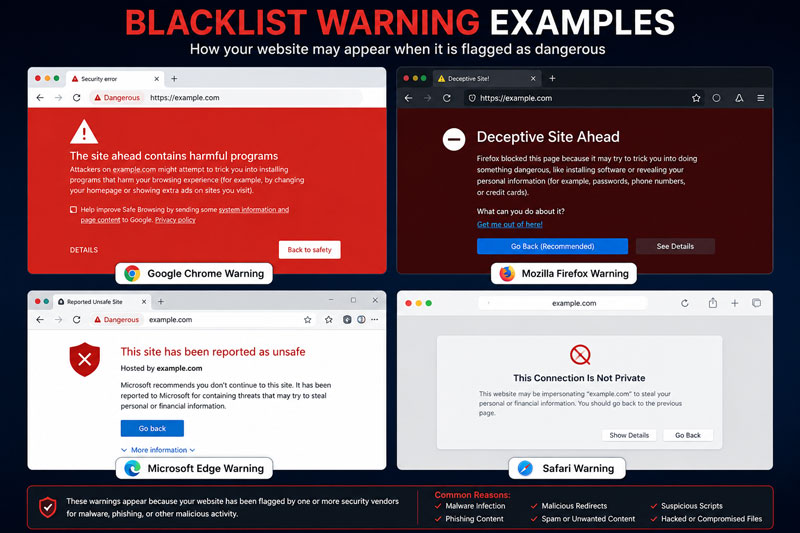
A website blacklist is a database maintained by search engines, antivirus companies, internet security providers, and web filtering services. These organizations continuously scan websites for malware, phishing pages, spam, malicious scripts, and other security threats. When a website is identified as potentially harmful, its domain or URL may be added to one or more blacklists.
Being blacklisted can affect your website in several ways, including browser security warnings, blocked access by antivirus software, email delivery issues, lower search engine visibility, and a significant loss of visitor trust.
Why Websites Get Blacklisted
There are several reasons a website may be added to a blacklist. The most common causes include:
- Malware infections caused by vulnerable plugins, themes, or outdated software.
- Phishing pages created by hackers to steal user credentials.
- Spam content or malicious redirects inserted into website files.
- Hidden JavaScript or obfuscated code that performs unauthorized actions.
- Distribution of malicious downloads or infected files.
- Compromised hosting environments that affect multiple websites.
- Weak passwords or unsecured admin accounts that allow attackers to gain access.
Even a legitimate website can become blacklisted if it is hacked without the owner’s knowledge.
What Is VirusTotal?
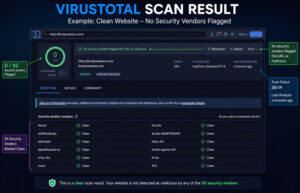
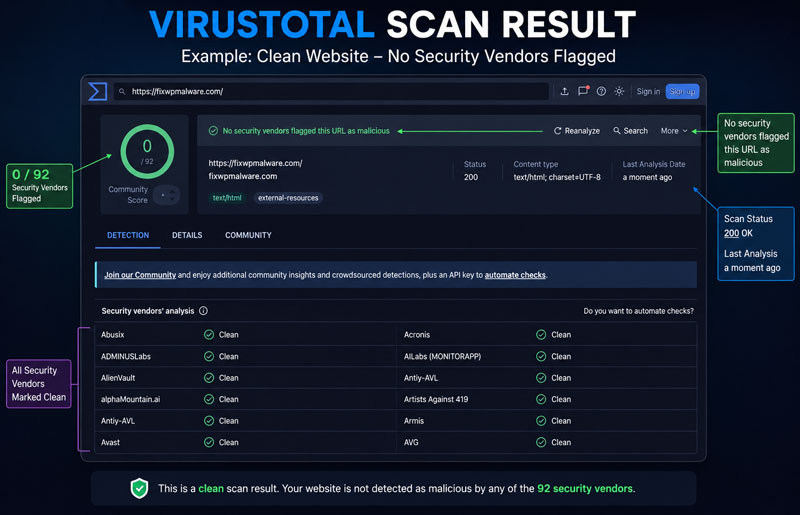
VirusTotal is a free online security analysis platform that scans URLs, domains, files, and IP addresses using dozens of trusted antivirus engines and website reputation services. Instead of relying on a single security vendor, VirusTotal aggregates results from multiple sources, giving website owners a comprehensive view of their website’s security status.
Security professionals, website owners, hosting providers, and cybersecurity researchers frequently use VirusTotal to identify malware infections, phishing websites, suspicious URLs, and other online threats.
How VirusTotal Works
When you submit a URL or domain to VirusTotal, the platform scans it using multiple antivirus engines and website reputation databases. Each security vendor independently analyzes the website based on its own detection technology, threat intelligence, and reputation systems.
The scan results show whether each vendor considers the website clean, suspicious, malicious, or involved in phishing or spam activities. Since every security company uses different detection methods and databases, scan results may vary from one vendor to another.
VirusTotal itself does not determine whether a website is malicious. Instead, it collects and displays detection results from participating security vendors in one centralized report.
Why VirusTotal Shows Multiple Security Vendors
VirusTotal partners with dozens of cybersecurity companies, antivirus vendors, and threat intelligence providers. Each vendor maintains its own malware signatures, detection algorithms, and reputation databases.
Because every company uses different criteria, one vendor may flag a website while others report it as clean. This diversity helps website owners identify exactly which security vendors have detected a problem, making it easier to investigate the issue and submit review requests after the website has been cleaned.
Why Your Website Appears on VirusTotal
If your website appears on VirusTotal, it usually means that one or more participating security vendors have detected suspicious activity associated with your domain or URL. Common reasons include malware infections, phishing content, malicious redirects, spam pages, compromised website files, infected JavaScript, or previously hacked content that has not been completely removed.
In some cases, detections may also result from false positives, where a legitimate website is mistakenly classified as harmful. Reviewing the detailed VirusTotal report helps identify which vendors have flagged your website and the type of threat they detected. Once your website has been thoroughly cleaned and secured, you can submit review requests to the affected security vendors to remove your website from their blacklists.
Security Vendors Covered
VirusTotal is not a blacklist itself. Instead, it aggregates scan results from dozens of trusted cybersecurity companies, antivirus vendors, and threat intelligence providers. Each vendor uses its own detection methods, malware signatures, and reputation database, which is why your website may be flagged by one vendor while appearing clean to others.
To help you resolve these issues efficiently, we’ve created dedicated guides for the most popular security vendors. Each guide explains why your website was flagged, how to remove the underlying issue, and how to submit a successful blacklist review request.
Below is an overview of the security vendors covered in this guide.
Google Safe Browsing
Google Safe Browsing protects billions of users from malware, phishing, deceptive content, and harmful downloads. If Google flags your website, visitors may see a security warning in Chrome and other supported browsers.
Read the complete Google Safe Browsing Blacklist Removal Guide →
McAfee
McAfee Website Reputation evaluates websites for malware, spam, phishing, and other security threats. A poor reputation can cause your website to be blocked for McAfee users.
Read the complete McAfee Website Blacklist Removal Guide →
Norton Safe Web
Norton Safe Web scans websites for malicious content and suspicious behavior. If your website is detected, Norton users may receive warnings before visiting your site.
Read the complete Norton Safe Web Blacklist Removal Guide →
Bitdefender
Bitdefender monitors websites for malware, phishing attacks, and dangerous scripts. Websites identified as unsafe may be blocked by Bitdefender security products.
Read the complete Bitdefender Website Blacklist Removal Guide →
ESET
ESET detects compromised websites, phishing pages, and malware infections using its global threat intelligence network.
Read the complete ESET Website Blacklist Removal Guide →
Forcepoint
Forcepoint categorizes websites based on security risks and web reputation. Incorrect or malicious classifications can restrict access for enterprise users.
Read the complete Forcepoint URL Blacklist Removal Guide →
CRDF
CRDF analyzes websites for malware, suspicious activity, and online threats that may affect website reputation.
Read the complete CRDF Blacklist Removal Guide →
Spamhaus
Spamhaus tracks domains and IP addresses associated with spam campaigns, malware distribution, and other malicious activities.
Read the complete Spamhaus Blacklist Removal Guide →
Yandex
Yandex Safe Browsing protects users by identifying websites that distribute malware or host phishing content.
Read the complete Yandex Blacklist Removal Guide →
Sucuri
Sucuri continuously monitors websites for malware, hidden backdoors, malicious redirects, and security vulnerabilities.
Read the complete Sucuri Blacklist Removal Guide →
Quttera
Quttera specializes in detecting website malware, malicious JavaScript, and hidden security threats.
Read the complete Quttera Blacklist Removal Guide →
OpenPhish
OpenPhish maintains a real-time database of phishing websites used by organizations worldwide.
Read the complete OpenPhish Removal Guide →
PhishTank
PhishTank is a community-driven platform that identifies and verifies phishing websites before sharing them with security vendors.
Read the complete PhishTank Removal Guide →
URLhaus
URLhaus tracks malicious URLs involved in malware distribution and cybercrime campaigns.
Read the complete URLhaus Blacklist Removal Guide →
Sophos
Sophos Web Protection blocks websites associated with malware, phishing, ransomware, and other online threats.
Read the complete Sophos Blacklist Removal Guide →
Trend Micro
Trend Micro evaluates website reputation and blocks websites that pose security risks to users.
Read the complete Trend Micro Blacklist Removal Guide →
Fortinet
Fortinet Web Filter categorizes websites and protects users against malicious or compromised domains.
Read the complete Fortinet URL Filter Removal Guide →
Kaspersky
Kaspersky Security Network uses global threat intelligence to identify dangerous websites and online threats.
Read the complete Kaspersky Website Blacklist Removal Guide →
Avast
Avast scans websites for malware, phishing attacks, and suspicious behavior to protect its users.
Read the complete Avast Website Blacklist Removal Guide →
Avira
Avira detects malicious websites and unsafe URLs using its cloud-based security network.
Read the complete Avira Website Blacklist Removal Guide →
As we publish more detailed tutorials, this page will be updated with additional blacklist removal guides for other security vendors supported by VirusTotal.
VirusTotal URL Blacklist Removal: How to Remove Malware
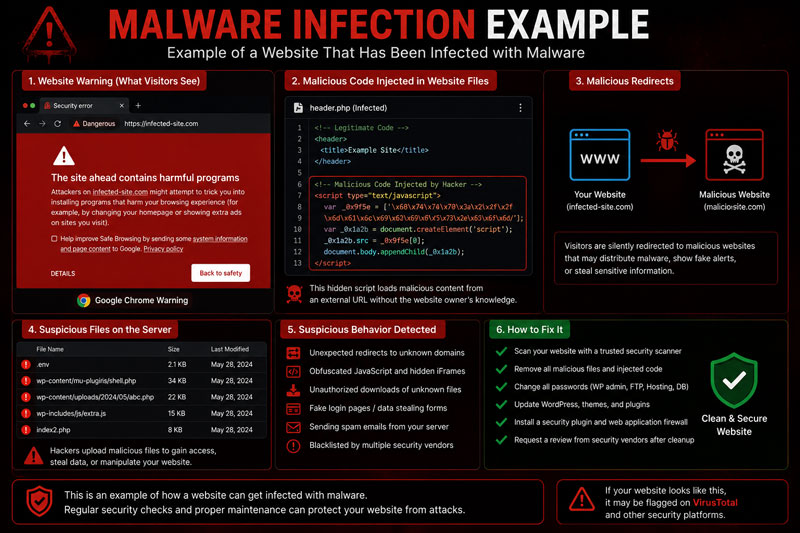
Before requesting blacklist removal, make sure your website is completely clean. Most security vendors will reject your review request if malware or malicious behavior is still detected during their rescan.
Follow these steps before submitting a delisting request:
1. Scan Your Website
Use trusted malware scanners such as VirusTotal, Sucuri SiteCheck, or your hosting provider’s security tools to identify infected files, malicious URLs, and suspicious scripts.
2. Remove Malware
Delete malicious files, phishing pages, spam content, unauthorized administrator accounts, and injected JavaScript. Update your CMS, themes, plugins, and extensions to their latest secure versions.
3. Secure Your Website
Change all passwords, enable two-factor authentication (2FA), review file permissions, and install a trusted website security solution to prevent future attacks.
4. Verify the Cleanup
Scan your website again using multiple security tools. Your website should no longer show active malware or suspicious behavior before you request a review.
How to Request a Review from Each Vendor
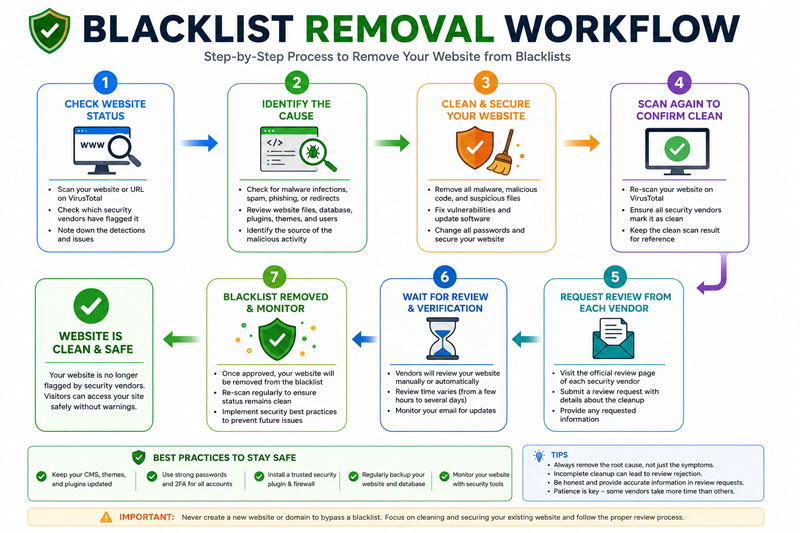
Once your website has been cleaned, you can request a blacklist review from the security vendors that flagged your domain.
Although each vendor has a different review process, the general steps are similar:
- Identify which vendors have flagged your website in VirusTotal.
- Visit the vendor’s official review or false-positive submission page.
- Provide your website URL and explain that the malware has been removed.
- Include any additional information requested by the vendor.
- Submit the review request and wait for the security team to complete a new scan.
Some vendors review websites within a few hours, while others may take several business days.
Common Reasons Delisting Gets Rejected
A blacklist removal request may be rejected if the security vendor still detects suspicious activity.
The most common reasons include:
- Malware is still present on the website.
- Hidden backdoors were not removed.
- Phishing pages still exist.
- Malicious redirects remain active.
- Spam or hacked content is still indexed.
- Outdated plugins or themes continue to expose security vulnerabilities.
- The website becomes reinfected before the review is completed.
- The review request does not include enough information.
Always perform a complete security audit before requesting delisting.
How Long Does Blacklist Removal Take?
The review time depends on the security vendor.
In general:
- Google Safe Browsing: 1–3 days
- Norton Safe Web: 2–14 days
- McAfee: 2–7 days
- Bitdefender: 1–5 days
- ESET: 1–5 days
- Sophos: 1–7 days
- Trend Micro: 2–7 days
- Fortinet: 1–5 days
Some vendors respond within a few hours, while others may take longer depending on the complexity of the review.
How to Prevent Future Blacklisting
Removing malware is only the first step. Keeping your website secure is equally important.
Follow these best practices:
- Keep WordPress, plugins, and themes updated.
- Use strong passwords and enable two-factor authentication.
- Install a trusted website firewall.
- Scan your website regularly for malware.
- Remove unused plugins and themes.
- Take automatic daily backups.
- Use SSL (HTTPS) across your entire website.
- Monitor user accounts and file changes.
- Choose a reliable hosting provider with strong security features.
- Perform regular website security audits.
Preventive maintenance significantly reduces the risk of future blacklist issues.
Frequently Asked Questions
What is VirusTotal?
VirusTotal is a free online security service that scans URLs, domains, files, and IP addresses using multiple antivirus engines and threat intelligence providers.
Does VirusTotal blacklist websites?
No. VirusTotal does not maintain its own blacklist. It displays detection results from many independent security vendors.
Why is my website detected by only one security vendor?
Each security company uses different detection methods and threat databases. A website may be flagged by one vendor while others consider it safe.
Can a clean website still appear on VirusTotal?
Yes. Occasionally, false positives occur. If your website is clean, you can submit a review request to the affected vendor.
How can I check whether my website is blacklisted?
Submit your domain or URL to VirusTotal and review which security vendors have flagged your website.
Will removing malware automatically remove my website from blacklists?
Not always. Many security vendors require you to submit a review request after your website has been cleaned.
Final Thoughts
A website appearing in VirusTotal can be concerning, but it doesn’t necessarily mean your website is permanently compromised. In most cases, the issue can be resolved by identifying the source of the infection, removing all malicious content, securing the website, and requesting reviews from the affected security vendors.
Whether your website is flagged by Google Safe Browsing, McAfee, Norton Safe Web, Bitdefender, ESET, Sophos, Trend Micro, Fortinet, or any other security provider, following the correct cleanup and delisting process greatly improves your chances of successful blacklist removal.
If you’re unable to remove the infection yourself or your website continues to be detected after cleanup, consider working with a professional malware removal specialist to ensure your website is fully cleaned, secured, and ready for successful blacklist removal.