Your WordPress site has been hacked, and you want it fixed. The first question most people ask is simple: how much will this cost? The honest answer is that it depends. Prices range from free (if you do it yourself) to more than a thousand dollars a year for premium security plans.
In this guide, we break down WordPress malware removal cost in 2026: what you can expect to pay with each option, what makes a cleanup more expensive, the hidden cost of choosing the cheapest offer and the questions to ask before you hire anyone.
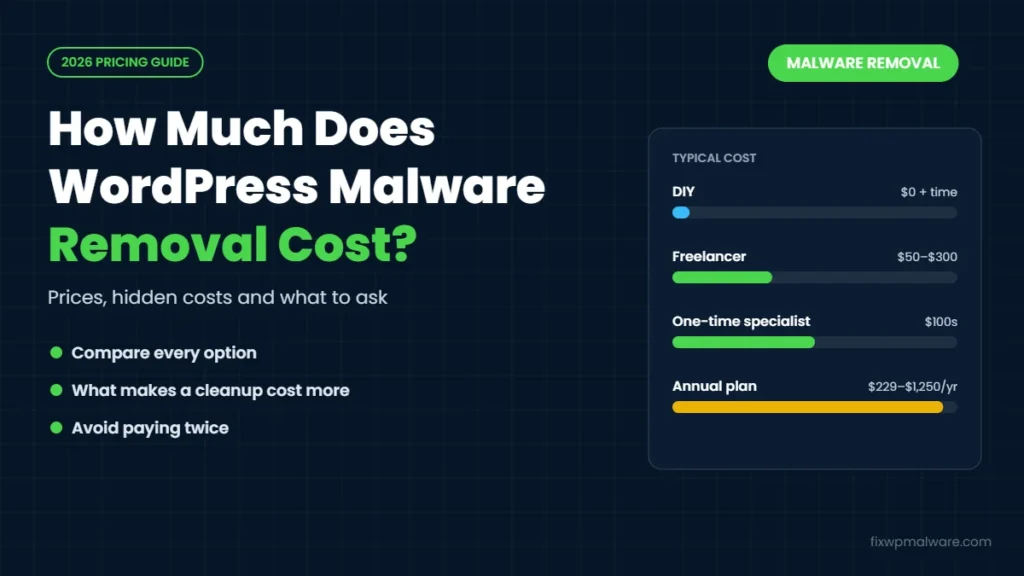
WordPress Malware Removal Cost at a Glance
Here’s a quick overview of the main options and what they typically cost:
- Do it yourself: $0 in fees, but it can take many hours, and mistakes can break your site or leave the malware behind
- Freelancer: on marketplaces like Upwork and Fiverr, simple cleanups are often offered from around $50 to $300 per site, depending on experience and the infection
- Security company subscription: annual plans that include malware removal, firewall and monitoring, usually a few hundred dollars per year and more for faster response
- Specialist one-time cleanup: a fixed price for one cleanup, usually ranging from about a hundred dollars to several hundred, depending on the site and how urgent it is
- Your hosting company: some hosts include basic cleanup, others charge separately or only scan and quarantine files
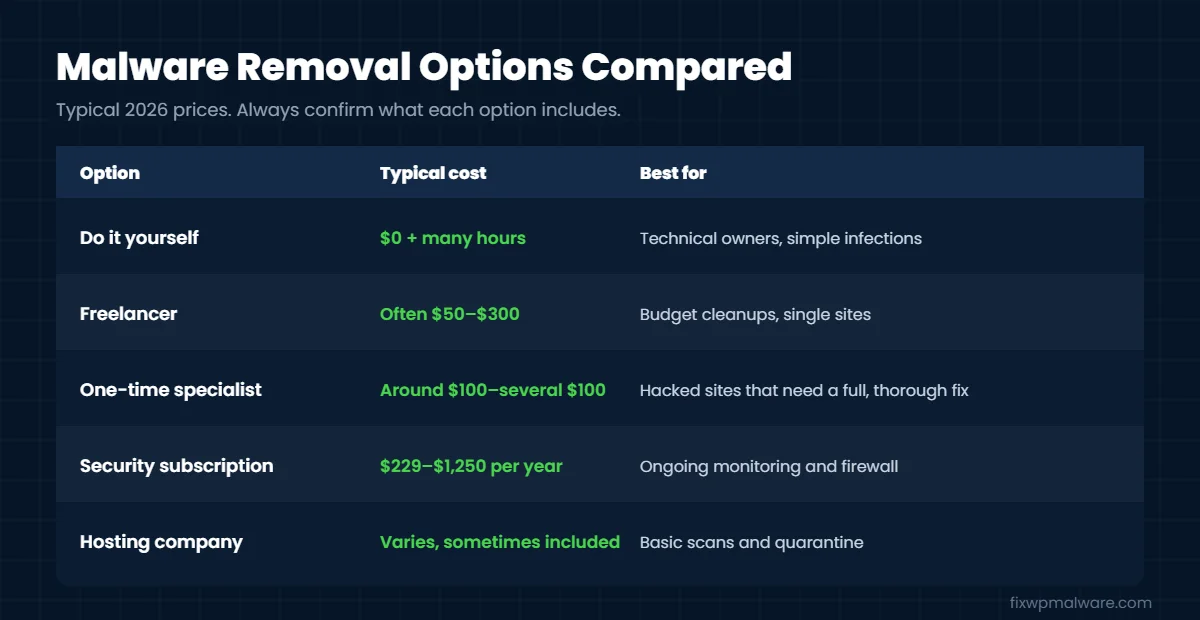
For reference, here’s what two well-known security companies list on their own pricing pages at the time of writing. Sucuri’s plans start at $229 per year, with $339 and $549 plans that promise faster malware removal response. Wordfence lists Wordfence Care at $590 per year and Wordfence Response at $1,250 per year, both including incident response and malware removal. Prices change, so always check the current page.
What Affects WordPress Malware Removal Cost?
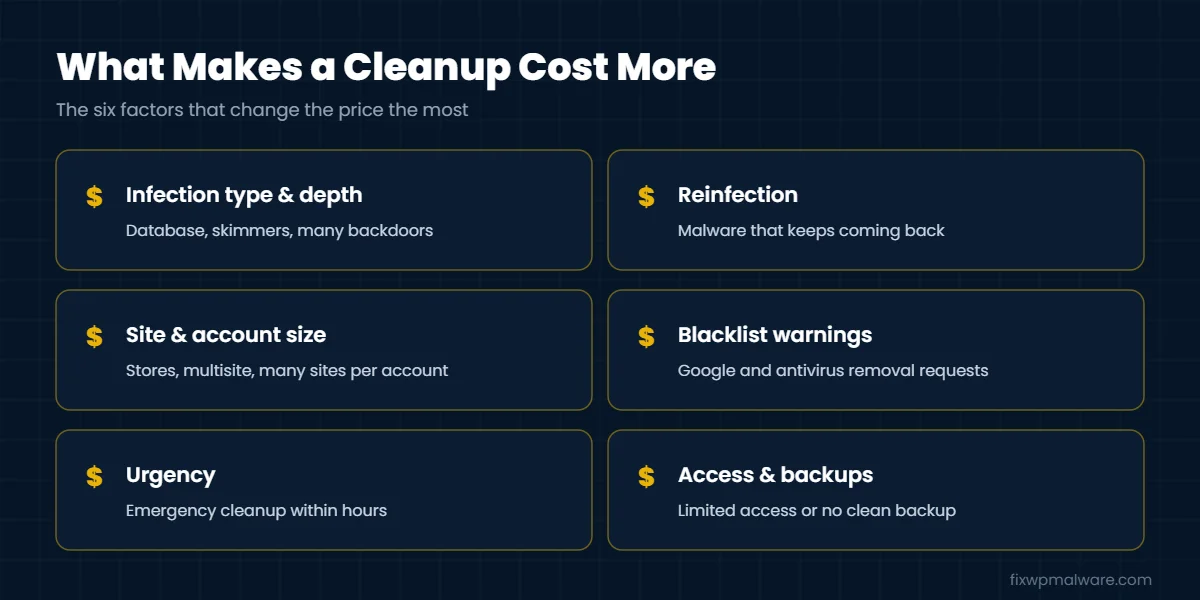
Two hacked sites can look the same from the outside and need very different amounts of work. These are the factors that change the price most:
1. Type and depth of the infection
A single malicious file is quick to remove. A site with a redirect hack, thousands of spam pages, a card skimmer or several backdoors takes much longer. Infections hidden in the database usually take more time than infections in files.
2. Reinfection
If the site has been cleaned before and the malware keeps coming back, the job is no longer just a cleanup. Someone has to find every backdoor and the original way in. That’s more investigation, and it costs more. Our guide on why a WordPress site keeps getting hacked explains why.
3. Size of the site and hosting account
A small business site with ten plugins is faster to clean than a large WooCommerce store, a multisite network or a hosting account with several infected websites that keep reinfecting each other.
4. Blacklist and Google warnings
If Google shows “Deceptive site ahead” or “This site may be hacked”, or antivirus vendors flag your domain, removing those warnings is extra work on top of the cleanup.
5. Urgency
Emergency cleanup within hours usually costs more than a standard turnaround, because the work has to start immediately.
6. Access and backups
Full hosting access (cPanel, SFTP or SSH and database access) makes a cleanup faster and cheaper. If access is limited or there is no clean backup, the job takes longer.
Example Scenarios: How the Cost Changes
To make this more concrete, here’s how the work, and the WordPress malware removal cost, typically changes from one site to another:
- Simple infection: a small business site with a few infected files and no Google warning. The cleanup is quick and sits at the lower end of the price range.
- Spam or redirect hack: a site with injected spam pages or redirects in the database, plus a “This site may be hacked” label in Google. Expect a mid-range price, because database cleaning and Google cleanup take extra time.
- Repeated reinfection on an online store: a WooCommerce store that keeps getting reinfected, with a card skimmer and several sites on the same hosting account. This is the most expensive type of job, because every site, file and database on the account has to be checked.
If you’re not sure which group your site falls into, a quick review of the site before quoting usually answers that.
The Hidden Cost of the Cheapest Option
It’s tempting to pick the lowest price, but a cheap cleanup often only removes the visible malware. If the backdoor stays, the hacker comes back, and you pay again. In our WooCommerce card skimmer case study, the hosting company had already quarantined malicious files twice, yet the malware kept returning because one hidden file was missed.
A hacked site also costs you money every day it stays infected:
- Lost sales and leads while visitors are redirected or blocked by browser warnings
- Lost rankings while Google indexes spam or shows a hacked label
- Ad accounts paused because Google Ads and other networks reject hacked sites
- Email problems if your domain is used to send spam
- Customer trust, which is the hardest thing to get back
When you compare prices, compare what’s included, not just the number.
What a Proper Malware Removal Should Include
Whatever you pay, make sure the service covers:
- A full scan of files and the database, not just a plugin scan
- Removal of every backdoor, unknown admin user and malicious scheduled task
- Reinstalling WordPress core, plugins and themes from clean sources
- Finding and closing the way the attacker got in
- Password and security key changes
- Help removing Google and antivirus warnings, if your site is flagged
- A short report of what was found and fixed
- Some kind of guarantee if the same infection comes back
If you want to understand what this work involves, our WordPress malware removal guide walks through each step.
Questions to Ask Before You Hire Someone
- Is the price fixed, or can it increase once you start?
- Do you clean the database as well as the files?
- Will you find out how the attacker got in?
- What happens if the malware comes back? Ask how long the guarantee lasts.
- Do you help with blacklist removal and Google warnings?
- How quickly can you start?
- Will I get a report of what you found?
A trustworthy provider will answer these clearly before you pay.
Is a Subscription or a One-Time Cleanup Better?
It depends on your situation:
- A one-time cleanup makes sense if your site was hacked once, you’re comfortable keeping it updated afterwards, and you want to fix the problem now without an annual commitment.
- A subscription makes sense if your site is business-critical, you don’t have time to maintain security yourself, or you want ongoing monitoring and a firewall.
Many site owners do both: a thorough one-time cleanup first, then a firewall and regular updates to prevent the next hack.
Can You Remove WordPress Malware Yourself for Free?
Yes, if you’re comfortable working with files, phpMyAdmin and possibly the command line. The cost is your time, and the risk is missing something or breaking the site. If you want to try, start with our checklist on what to do in the first 24 hours after a hack. If the malware returns after your cleanup, that’s usually the point where professional help saves money.
Frequently Asked Questions
How much does it cost to fix a hacked WordPress site?
For most small and medium sites, a professional one-time cleanup usually costs from around a hundred to a few hundred dollars. Large stores, repeated reinfections, blacklist removal and emergency service cost more. Annual security plans that include cleanup typically cost a few hundred dollars per year or more.
Why do prices vary so much?
Because the work varies. Removing one infected file takes minutes, while tracing a skimmer, several backdoors and an infected database across a shared hosting account can take a full day.
Does my hosting company remove malware for free?
Some hosts offer basic scanning or cleanup, but many only quarantine infected files or suspend the site until you fix it. Check what your plan includes and whether they also clean the database.
Is a security plugin enough instead of paying for removal?
Security plugins are good at detection and prevention, but they often can’t remove malware hidden in the database or identify how the attacker got in. They work best alongside a proper cleanup.
Should I just rebuild the site instead?
Rebuilding can work for small sites, but it takes time and you can carry the infection into the new site if you reuse content, plugins or the same hosting account without cleaning it. A cleanup is usually faster and cheaper.
Get a Clear Price for Your Site
Every hacked site is different. Tell us what’s happening and we’ll review your site and give you a clear quote before any work starts. Our cleanup includes files, database, backdoors, the entry point and help with Google warnings. Reach us through our contact page, or go straight to emergency malware removal if your site is infected right now.